Available on macOS, Windows & Linux

Your voice,
typed instantly

Scribble is a blazing-fast speech-to-text app that runs entirely on your desktop. Press a shortcut, speak, and your words appear — anywhere you type.

macOS
Windows
Linux

How It Works

Three simple steps. No learning curve.

Step 1

Press your shortcut

Configure any hotkey. Press it from any app — Scribble starts listening instantly.

Step 2

Speak naturally

Talk at your normal pace in 40+ languages. Scribble understands you.

Step 3

Text appears instantly

Your words are typed wherever your cursor is — emails, docs, chat, code editors.

Everything you need. Nothing you don't.

Built for developers, writers, and anyone who thinks faster than they type.

Instant transcription

Hold a hotkey, speak, release. Your text is typed wherever your cursor is — in any app, instantly.

100% private

Runs locally with Whisper AI. Your audio never leaves your machine — no cloud, no subscriptions.

40+ languages

Auto-detects your language. English, Arabic, French, Spanish, German, Japanese, and dozens more.

AI post-processing

Pipe transcriptions through an LLM to fix punctuation, summarize, or reformat — your prompts.

Multiple models

Whisper Tiny to Large-v3, Parakeet, Moonshine. Balance speed vs accuracy for your workflow.

Fully customizable

Custom hotkeys, VAD sensitivity, silence detection, history browser, cloud API fallback.

Powered by industry-leading technology

OpenAI Whisper
React
Tauri
Rust
Silero VAD
5 app screens

See Scribble in Action

A clean, intuitive interface designed to stay out of your way.
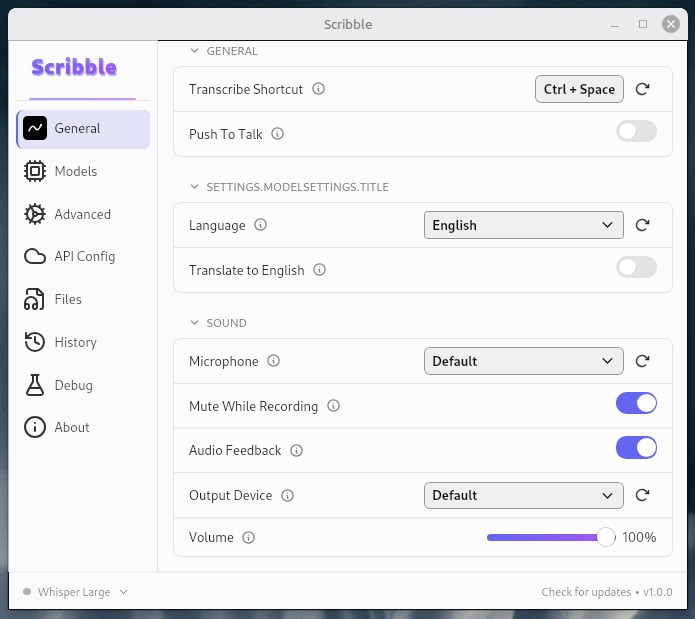
Scribble General Settings
General Settings

Shortcuts, language, microphone & audio configuration
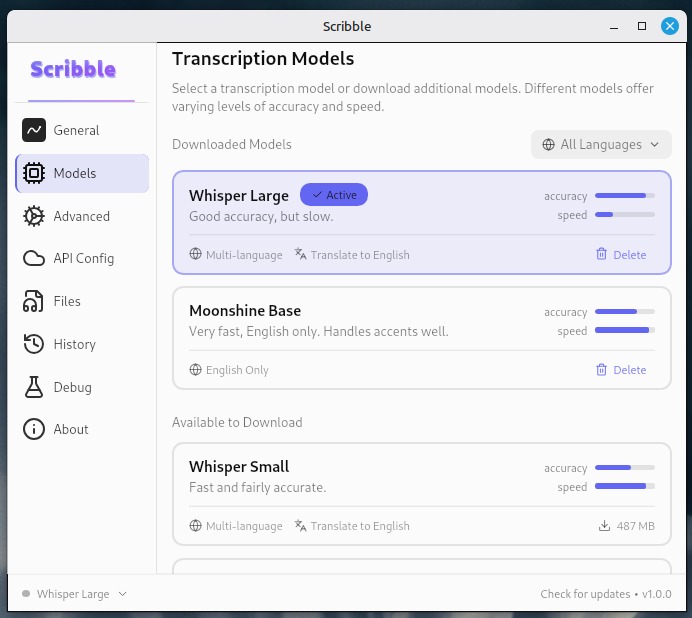
Scribble AI Models
AI Models

Whisper Large, Moonshine Base & more — balance speed vs accuracy
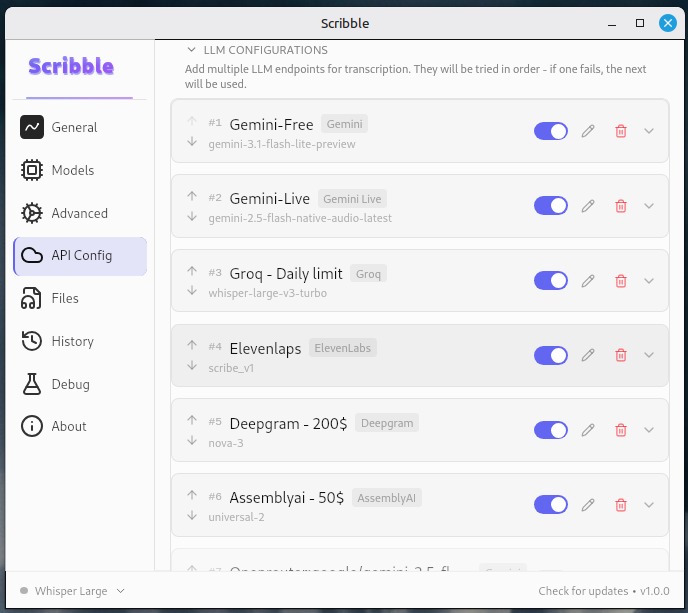
Scribble API Configuration
Cloud API Providers

Gemini, Groq, Deepgram, ElevenLabs & AssemblyAI with ordered fallback
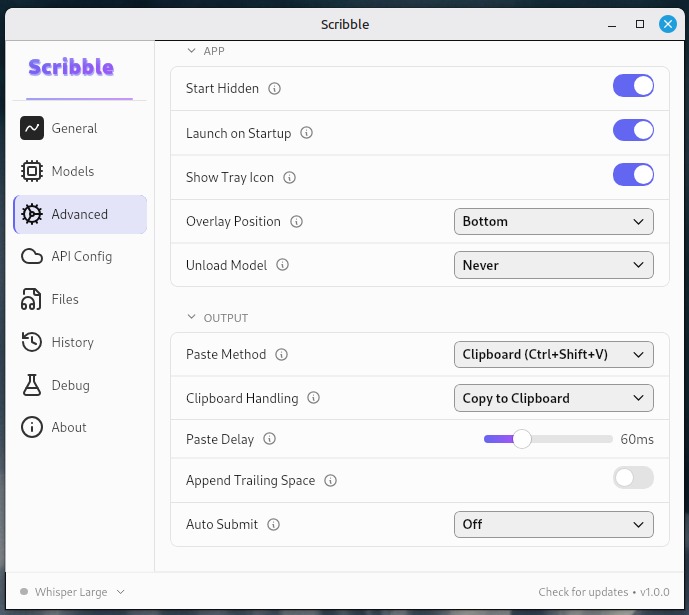
Scribble Advanced Settings
Advanced Settings

Paste method, clipboard handling, overlay & output control
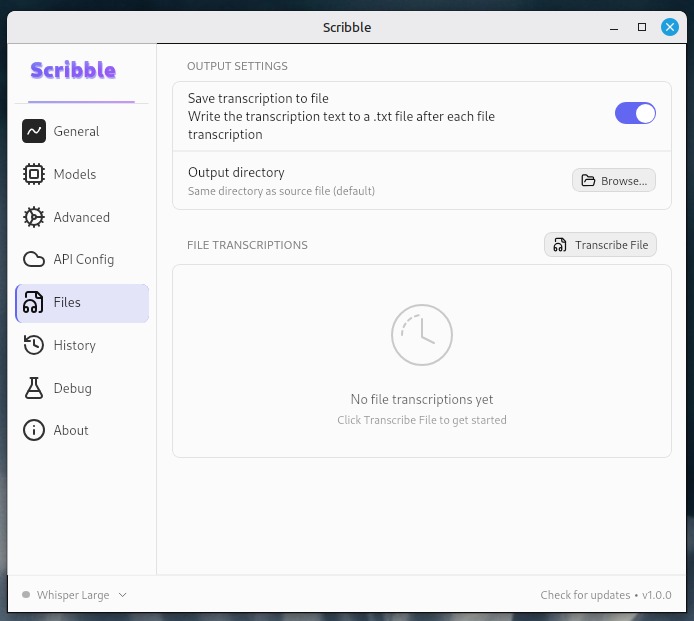
Scribble File Transcription
File Transcription

Transcribe audio files directly with batch processing support

One-time purchase · No subscription

Simple, honest pricing

Pay once, own it forever. Instant license delivery by email.

1 device

Scribble Starter

Great for individual use on a single workstation.

499 EGP one-time
  • All transcription models
  • Lifetime updates
  • Email support
Buy Scribble Starter
Most popular
3 devices

Scribble Pro

For power users across desktop, laptop, and a spare.

999 EGP one-time
  • Everything in Starter
  • 3 device activations
  • Priority email support
Buy Scribble Pro
10 devices

Scribble Team

Share one license across a small team or studio.

2,499 EGP one-time
  • Everything in Pro
  • 10 device activations
  • Dedicated support channel
Buy Scribble Team

Secure checkout powered by Kashier. Accepted: Visa, Mastercard, Meeza, and Egyptian wallets.

Frequently Asked Questions

Everything you need to know about Scribble.

Is my audio sent to the cloud?

No. Scribble runs Whisper AI entirely on your machine. Your audio never leaves your device. If you optionally enable Cloud API mode for higher accuracy, audio is sent to the provider you choose (Deepgram, Groq, etc.) — but local mode is always available.

What languages are supported?

Scribble supports 40+ languages including English, Arabic, French, Spanish, German, Japanese, Korean, Chinese, Portuguese, Russian, and many more. Language detection is automatic — just speak and Scribble figures out the rest.

What are the system requirements?

Scribble runs on macOS (10.13+), Windows 10/11, and Linux (Ubuntu 20.04+, Fedora 36+, and most modern distros). It uses GPU acceleration where available (Metal on macOS, Vulkan on Windows/Linux) but works on CPU too.

Do I need an internet connection?

Not for local transcription. Scribble downloads the AI model once, then works fully offline. Internet is only needed if you enable the optional Cloud API providers for higher accuracy.

What AI models are available?

Scribble supports Whisper Tiny through Large-v3, Parakeet, and Moonshine models. Smaller models are faster but less accurate; larger models are slower but more precise. You can switch models anytime in settings.

How do I activate my license?

After checkout you'll receive your license key by email instantly. Enter it in Scribble's activation screen on first launch. Your plan determines how many devices the key can activate (1, 3, or 10).

Download Scribble

Available for macOS, Windows, and Linux.

Also available: macOS Intel .dmg · Windows .msi · Linux .rpm · Linux .AppImage

Requires a license key to activate. See pricing